
Quick verdict on this ClickUp review: it’s the most feature-complete project management tool you can get for free. If you’re a freelancer, small team, or remote-first company that’s outgrown sticky notes and spreadsheets, it’s worth the 10 minutes it takes to set up — the free plan alone replaces three or four other tools.
Pricing checked against each vendor’s own pricing page on 26 August 2026. Vendors change plans often — confirm before you buy.
This post contains affiliate links — if you sign up through them, we may earn a commission at no extra cost to you. See our Affiliate Disclosure and Methodology for details.
Table of Contents
At a Glance
- Best for: Freelancers, small teams, remote/hybrid companies
- Starting price: Free forever (unlimited members); paid plans from $7/user/month (billed annually)
- Free trial on paid plans: 14 days, no credit card required to start on Free
- Standout feature: Unlimited free members — most competitors charge per seat from day one
- Biggest catch: AI features (ClickUp Brain) cost extra on top of your plan
What Is ClickUp, Exactly?
ClickUp bills itself as the “everything app for work” — and for once, that’s not just marketing fluff. It combines task management, docs, chat, whiteboards, goal tracking, and time tracking into a single workspace. The pitch is simple: instead of paying for Asana, Notion, Slack, and Toggl separately, you run all of it inside ClickUp. I also compared ClickUp and Asana directly.
That’s an attractive promise for anyone watching their software budget. The real question — the one this review actually answers — is whether ClickUp delivers on it without becoming its own source of overhead.
Who Should (and Shouldn’t) Use ClickUp
ClickUp earns its strongest reviews from small agencies, freelancers juggling multiple clients, and remote teams that need everyone aligned across time zones. If you’re the type of person who wants one dashboard for tasks, deadlines, and client docs — instead of five browser tabs — this is built for you.
It’s a worse fit if you want something you can set up in five minutes and never touch again. ClickUp’s biggest recurring criticism, across hundreds of user reviews, isn’t a missing feature — it’s the opposite. The sheer number of views, fields, and settings can overwhelm new users, and a few reviewers mention the interface feeling dense until you’ve spent a week customizing it to your workflow.
Key Features That Actually Matter
Multiple ways to view your work
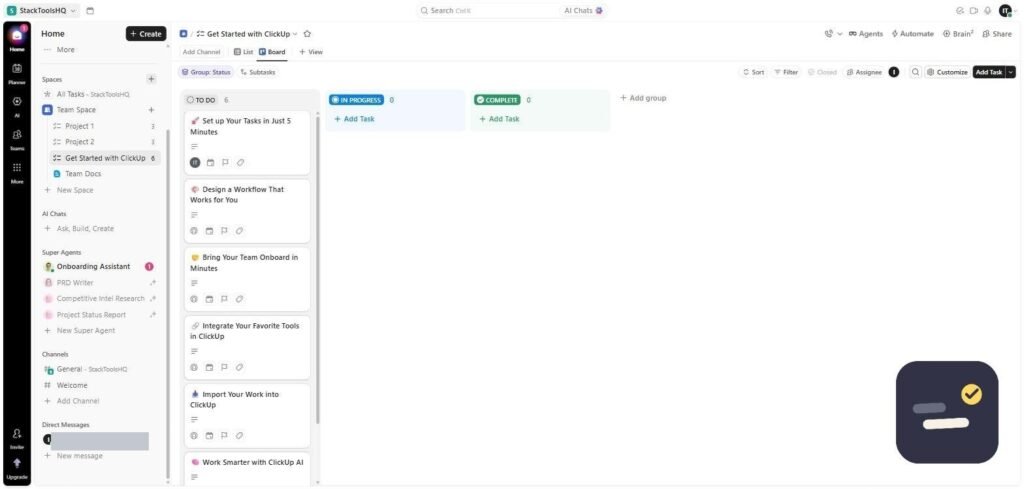
List, Board (Kanban), Calendar, Gantt, and Timeline views all pull from the same underlying tasks. A freelancer can work in a simple list while a client-facing project manager checks the same data as a Gantt chart — no duplicate entry required.
Docs and collaboration built in
ClickUp Docs handle everything from meeting notes to full client proposals, and they link directly to tasks — so a brief doesn’t live in a separate app from the work it describes.
Automation that scales with your plan
Even the Unlimited plan includes usable automation (recurring tasks, status-change triggers), which is often locked behind higher tiers in competing tools.
ClickUp Brain (AI) — genuinely useful, but priced separately
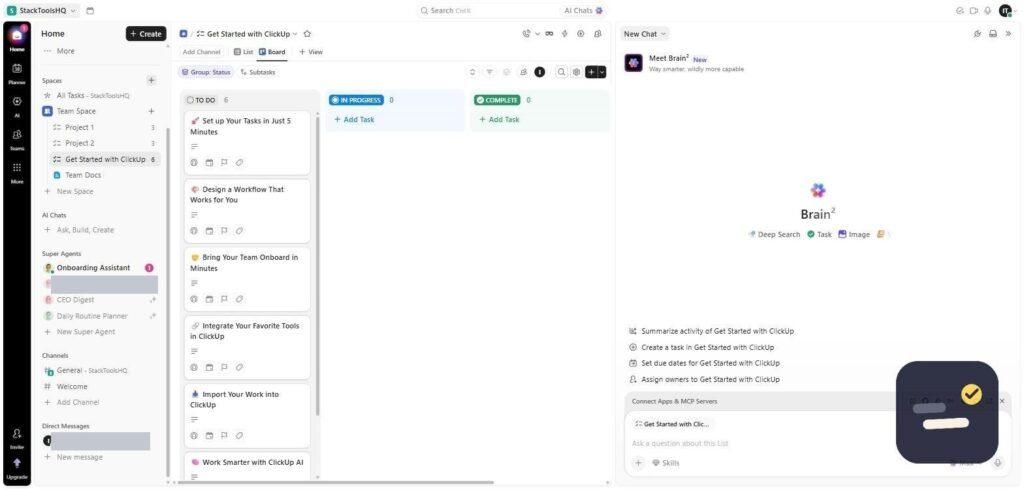
ClickUp’s AI layer can summarize threads, draft task updates, and answer questions about your workspace. It’s a real capability, not a gimmick — but it’s a $9/user/month add-on layered on top of whatever plan you’re already paying for, so budget for it separately if AI is a priority.
ClickUp Pricing Breakdown (2026)
| Plan | Price (annual billing) | Best For |
|---|---|---|
| Free Forever | $0 — unlimited members | Solo users, testing the waters |
| Unlimited | $7/user/month | Small teams outgrowing the free tier |
| Business | $12/user/month | Growing teams needing sprints & reporting |
| Enterprise | Custom pricing | Large orgs needing SSO & advanced security |
Note: Monthly billing costs more per seat than annual — expect roughly 30-40% higher rates if you’re not ready to commit to a year. ClickUp Brain (AI) adds $9/user/month on any paid plan.
For most freelancers and small teams, the Unlimited plan at $7/user/month is the sweet spot — it removes the Free plan’s storage and view limits without paying for Business-tier reporting most small teams don’t need yet.
What Real Users Say
✅ What people consistently praise
- The free plan is genuinely usable for running a real business, not just a trial
- Strong customization — workflows can be shaped to match exactly how a team already works
- Solid mobile app and real-time notifications, useful for remote teams across time zones
- Responsive customer support that many reviewers call out by name
⚠️ What people consistently complain about
- The learning curve is real — expect a week or two before it clicks
- Performance can lag on very large workspaces with heavy customization
- Occasional bugs after feature updates, though most reviewers say support resolves them quickly
- Add-ons (AI, extra permissions) can push the “affordable” plan closer to competitors’ prices
ClickUp vs. the Alternatives
If you’ve looked at Asana or Monday.com too, here’s the short version: Asana’s list pricing runs noticeably higher than ClickUp’s at comparable tiers, and Monday.com’s automation limits are tighter at the same price point. Notion is a stronger pure-docs tool, but it lacks ClickUp’s native Gantt charts and task automation. ClickUp’s trade-off is breadth over simplicity — you get more in one place, at the cost of a steeper first week.
Our ClickUp Review Verdict
ClickUp earns its popularity honestly. For freelancers and small teams, the free plan alone is enough reason to try it — there’s no real financial risk, and the unlimited-members policy means you can bring your whole team or client roster in without a per-seat penalty. If you outgrow it, the $7/user/month Unlimited plan is priced fairly against the competition.
The honest caveat: give yourself a real first week to set it up properly before judging it. Most of the negative reviews come from people who tried to use every feature on day one. Set up one project, one view, and expand from there — that’s where ClickUp stops feeling overwhelming and starts feeling like the “everything app” it promises to be.
Ready to stop juggling five different apps?
Frequently Asked Questions
Is ClickUp really free forever?
Yes. The Free Forever plan has no time limit and allows unlimited members, though storage is capped and some features (like Gantt charts and custom fields) have monthly-use limits.
Does ClickUp work well for solo freelancers?
Yes — many freelancers use the Free plan to manage multiple clients in separate Spaces, with no per-client cost.
Is ClickUp Brain (the AI feature) worth the extra cost?
If you regularly summarize long threads or write task updates, the $9/user/month add-on pays for itself in time saved. If you’re on a tight budget, it’s safe to skip at first and add it later.
What’s the biggest reason people switch away from ClickUp?
Teams that want maximum simplicity over customization sometimes move to lighter tools. If you want fewer settings and less setup time, that trade-off is worth knowing upfront.
Still deciding? This ClickUp review covers the platform on its own, but if you’re weighing it against a docs-first alternative, see our ClickUp vs Notion comparison, or browse our wider best AI tools for freelancers roundup for the rest of the stack.

Written by Ivan T.
Founder of StackToolsHQ. Writes hands-on reviews and comparisons of productivity and AI tools for freelancers, small teams, and remote workers. More about this site.