
The best email automation tools for solo entrepreneurs in 2026 need to do one thing well without a marketing department to run them: keep leads warm automatically while you do the actual work. We picked three that fit a one-person budget and one-person time.
This post contains affiliate links — if you sign up through them, we may earn a commission at no extra cost to you. See our Affiliate Disclosure and Methodology for details.
Table of Contents
1. GetResponse — Best All-in-One for Solo Founders
GetResponse bundles email, automation, and landing pages so a solo entrepreneur isn’t juggling three separate subscriptions. The visual automation builder handles welcome sequences and abandoned-interest follow-ups without daily attention.
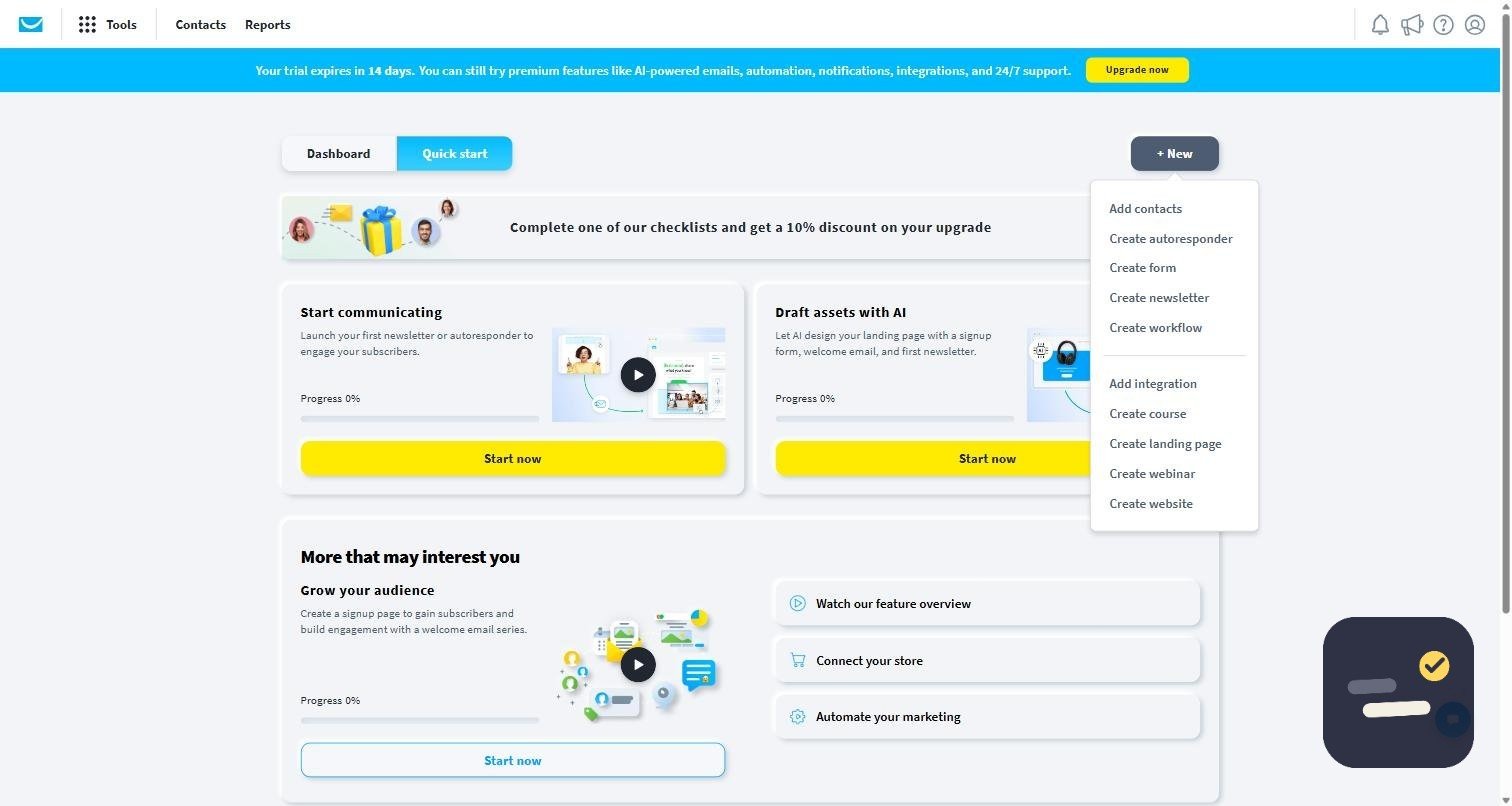
Where it actually saves time: a solo entrepreneur rarely needs separate email, landing page, and webinar tools — GetResponse folds all three into one login and one bill. That matters more for time than money once you count the hours spent context-switching between apps.
Setup reality: the quick-start flow gets a first list and a first automation running in under an hour, which is the bar that actually matters when you have no time to spare. The automation builder is visual and forgiving of a first attempt — a basic welcome sequence does not need a tutorial.
Pricing: Starter from $19/month. Read our full GetResponse review.
2. Mailchimp — Best for Design-Focused Solo Brands
If your emails need to look polished with minimal design effort, Mailchimp’s template library and drag-and-drop editor are still a strength, with deep integrations into Shopify and Canva for solo sellers.
Where it actually saves time: if your product is visual — a shop, a course with a polished brand, a newsletter people forward — the editor produces something presentable without a design background. That is worth more to some solo businesses than deeper automation.
Watch for: automation and behavioral triggers sit behind higher tiers than they used to. Price the plan you would actually need, not the free one, before assuming Mailchimp is the cheaper option.
Pricing: Free plan limited to 250 contacts; paid plans scale from there. See our GetResponse vs Mailchimp comparison.
3. Zapier — Best for Connecting Email to Everything Else
Neither GetResponse nor Mailchimp connects natively to every tool a solo entrepreneur uses. Zapier fills that gap — a new form submission can automatically add someone to your email sequence without you touching either platform.
Where it actually saves time: Zapier is not a third email tool — it is the glue between the two above and whatever else you already use: a form builder, a scheduling app, a spreadsheet. One new-lead trigger, one action, done.
Watch for: the free plan’s task limit disappears fast once a busy form is connected. Track usage for the first month before assuming the free tier will hold.
Pricing: Free for 100 tasks/month. Read our full Zapier review.
The Three Side by Side
| Tool | Best for | Free plan | Paid from |
|---|---|---|---|
| GetResponse | One tool covering email, pages, and automation | Trial only | $19/mo |
| Mailchimp | Polished design with minimal effort | 250 contacts | ~$20/mo |
| Zapier | Connecting email to everything else | 100 tasks/mo | $19.99/mo |
If you can only pay for one thing this month, it is the email tool, not the automation glue — Zapier only earns its subscription once there is a specific handoff worth automating.
How to Choose Email Automation Tools as a Solo Entrepreneur
Start with one automated sequence — usually a welcome series for new subscribers — before building anything more complex. Among the best email automation tools for solo entrepreneurs, GetResponse alone covers most needs without extra subscriptions; add Zapier only once you notice a specific manual handoff between apps that’s costing you real time every week.
The One Sequence Worth Building First
Skip the elaborate funnel diagrams for now. The single highest-leverage automation for a solo entrepreneur is a three-email welcome sequence: one sent immediately when someone subscribes, one two days later with your best piece of content or a case study, one five days later with a direct offer or next step.
That alone covers most of what “email automation” means for a one-person business. Everything more elaborate — behavioral branching, cart abandonment, re-engagement campaigns — is worth building only once the welcome sequence is live and you have noticed a specific gap it does not cover.
The Real Constraint Is Time, Not Tools
All three tools here do more than a solo entrepreneur will use in year one. The limiting factor is rarely the software — it is finding the hour to write the welcome sequence and the afternoon to test it. Block that time before comparing features any further; the comparison matters much less than actually shipping the first automation.
If you are still deciding what to automate first more broadly, our guide on automating daily tasks with AI covers picking the right first target.
Mistakes That Waste a Solo Budget
- Paying for a paid tier before the free plan or trial has actually been used to send real email to real subscribers.
- Building five automations before the first one has run long enough to show whether it works.
- Writing the welcome sequence in the tool itself instead of a document first — you will edit it more honestly outside the chat box.
- Adding Zapier before identifying the specific manual task it would remove. “It might be useful” is not a reason to pay for another subscription.
- Copying a template sequence from a course or blog post word for word. A generic sequence converts worse than three honest emails in your own voice.
None of these mistakes are expensive individually, but a solo budget cannot absorb five small ones at once the way a funded team can.
Frequently Asked Questions
What’s the cheapest email automation tool for a solo entrepreneur?
Mailchimp’s free plan (250 contacts) costs nothing, though automation features are limited at that tier. GetResponse’s $19/month Starter plan is the cheapest paid option with full send limits.
Do I need Zapier if I already use GetResponse?
Only if you need to connect GetResponse to a tool it doesn’t integrate with natively. Many solo entrepreneurs never need it.
How many email sequences should a solo entrepreneur set up first?
One — a welcome sequence for new subscribers. Get that working reliably before adding more automated sequences.