
Quick verdict on HubSpot vs Zoho CRM: Zoho CRM wins on price at almost every tier — a 10-person team pays roughly $230/month on Zoho versus $900/month on HubSpot Professional. HubSpot wins on ease of use and marketing-sales alignment if you can absorb the cost. For most budget-conscious small businesses, Zoho is the clearer value. For a wider list, see the AI tools I recommend for small businesses.
This post contains affiliate links — if you sign up through them, we may earn a commission at no extra cost to you. See our Affiliate Disclosure and Methodology for details.
Table of Contents
At a Glance
Pick HubSpot if…
- You run sales and marketing together and want one unified platform
- Ease of use and onboarding matter more than price
Pick Zoho CRM if…
- Budget and gradual scaling matter most
- You want deep customization via Canvas Design Studio
HubSpot vs Zoho CRM: Core Differences
HubSpot is built as a unified marketing-first platform — Marketing Hub, Sales Hub, Service Hub, and Content Hub all share one system, so leads flow naturally from first website visit to closed deal. Zoho CRM takes the opposite approach: maximum flexibility at minimum cost, with a Canvas Design Studio that lets you customize nearly every aspect of the interface and workflow to match your team’s exact process.
HubSpot vs Zoho CRM: Pricing Comparison (2026)
| Tier | HubSpot | Zoho CRM |
|---|---|---|
| Free | 2 users, no workflow automation | 3 users, includes basic automation |
| Entry paid | Starter ~$15-20/user/mo | Standard ~$14-20/user/mo |
| Mid-tier | Professional ~$90-100/user/mo + $3,000 mandatory onboarding fee | Professional ~$23/user/mo |
| Top tier | Enterprise ~$3,600/mo | Ultimate ~$52/user/mo |
The gap widens sharply at the professional tier — a 10-person team pays roughly $8,040 more per year on HubSpot Professional than on Zoho CRM Professional for comparable automation features.
Where HubSpot Wins
- Ease of use — consistently rated easier to learn across G2 and Capterra
- App marketplace — 2,000+ integrations, 2.5M+ active installs
- Onboarding resources — HubSpot Academy is genuinely best-in-class
Where Zoho CRM Wins
- Price at scale — gradual scaling instead of HubSpot’s steep cliff
- Customization — Canvas Design Studio reshapes nearly every screen
- Free plan — supports 3 users and includes basic automation, unlike HubSpot’s free tier
HubSpot vs Zoho CRM: Our Verdict
If budget is a real constraint and your team has some patience for setup, Zoho CRM delivers more automation per dollar at nearly every tier — the free plan alone outperforms HubSpot’s free CRM. HubSpot earns its premium price only if unified sales-and-marketing workflows and fast onboarding are worth paying 3-4x more for. Most small businesses evaluating both fresh will find Zoho the stronger value; HubSpot makes more sense once you’re already committed to its ecosystem.
Frequently Asked Questions
Is Zoho CRM cheaper than HubSpot?
Yes, significantly, especially at mid and upper tiers — Zoho’s Professional plan costs roughly a quarter of HubSpot’s Professional tier for comparable automation features.
Does HubSpot’s free CRM include automation?
No. HubSpot’s free tier withholds workflow automation and custom deal stages — these only unlock at the Professional tier, which also requires a mandatory onboarding fee.
Which CRM is easier to learn?
HubSpot, consistently, across G2 and Capterra reviews. Zoho’s deep customization creates a steeper learning curve, especially without a dedicated CRM admin.
For a wider view of how these two stack up against other options, Capterra’s CRM category page lets you filter by team size and budget as a sanity check before committing to either platform. And if a CRM turns out to be more than your team needs right now, our best AI tools for small businesses guide covers lighter alternatives worth considering first.
Real-World Setup Experience
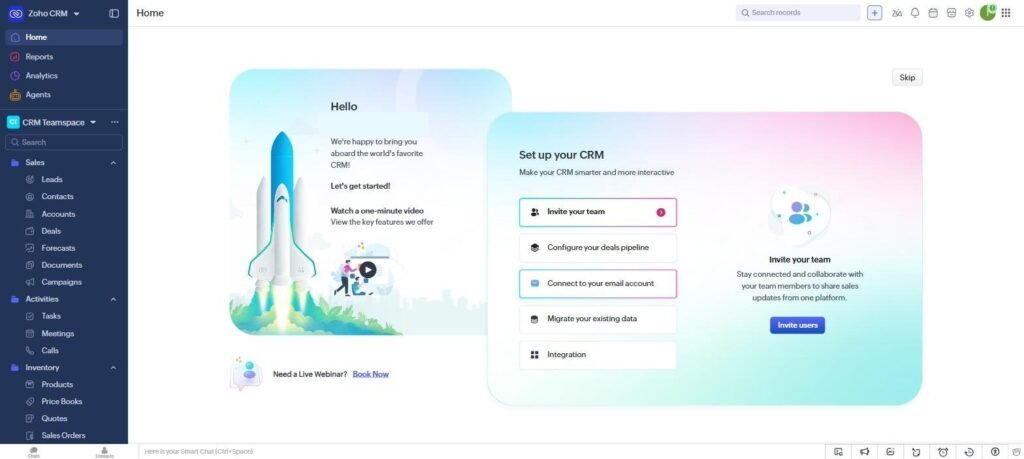
Setting up a free Zoho CRM account took about 10 minutes from signup to a usable pipeline — Zoho’s setup wizard walks you through your first pipeline stages and imports a sample deal automatically. The interface felt dense on first login, with more menu items visible at once than HubSpot shows, but nothing was hidden behind upsells during setup.
HubSpot’s free-tier onboarding was faster to get to “wow” — the Sales Hub dashboard shows a clean home screen with a one-minute intro video and clear setup checklist (invite team, configure deal pipeline, connect email, import contacts). It took under 15 minutes to have a working pipeline with sample deals. The tradeoff shows up later: several of the more useful automation and reporting features are visibly gated behind upgrade prompts even on the free plan, which Zoho’s free tier gates less aggressively.
The practical difference: HubSpot’s interface is more polished and easier to demo to a team on day one. Zoho gives you more functional depth for free, but expects you to dig for it rather than being guided to it.
Who Should Avoid Each Tool
Who should avoid HubSpot
If your team is under 5 people and budget-sensitive, HubSpot’s pricing jumps are steep — moving past the free tier’s contact and feature limits pushes you to Professional pricing fast, and per-seat costs add up quickly for a growing sales team. Businesses that mainly need contact and deal tracking without heavy marketing automation are usually paying for features they won’t touch.
Who should avoid Zoho CRM
If your team values interface polish and a shallow learning curve over raw feature count, Zoho’s denser menus and less-guided setup can slow onboarding for non-technical sales reps. Teams that already use HubSpot’s marketing tools (email, landing pages, ads) will also find Zoho’s marketing side noticeably less integrated with its CRM than HubSpot’s all-in-one suite.
Alternatives to Consider
If neither fits, it’s worth stepping back to ask what a CRM should actually do for your business before picking one on price alone — our guide to what a CRM actually does walks through that decision. For teams whose core need is task and project tracking rather than sales-pipeline management, a general productivity tool like ClickUp can sometimes cover the basics without the cost of a dedicated CRM.
Can I migrate from HubSpot to Zoho (or vice versa) later?
Yes — both support CSV import/export for contacts and deals, so migrating core data is straightforward. What doesn’t migrate cleanly is automation workflows, email templates, and custom fields, which you’ll need to rebuild manually on the new platform.
Which one has better customer support?
HubSpot’s free-tier support is mostly self-serve (help docs and community forum), with live chat support reserved for paid plans. Zoho offers email and phone support even on lower tiers, though response times can be slower than HubSpot’s paid-tier live chat.

Written by Ivan T.
Founder of StackToolsHQ. Writes hands-on reviews and comparisons of productivity and AI tools for freelancers, small teams, and remote workers. More about this site.