Quick verdict for this Grammarly review: the free plan alone is worth installing for basic grammar and clarity checks across every app you write in. Pro, at $12/month, earns its cost once tone detection and full-sentence rewrites become part of your daily writing.
Pricing checked against each vendor’s own pricing page on 26 August 2026. Vendors change plans often — confirm before you buy.
This post contains affiliate links — if you sign up through them, we may earn a commission at no extra cost to you. See our Affiliate Disclosure and Methodology for details.
Table of Contents
At a Glance
- Best for: Anyone writing client emails, proposals, or content across multiple apps
- Free plan: Genuinely usable, not just a limited trial
- Pro: $12/month (annual); Business is $15/member/month
- Coverage: Works across 500,000+ apps and websites, not one editor
What Grammarly Actually Does
Grammarly checks grammar, spelling, clarity, and tone as you type — not just in a dedicated editor, but as a browser extension and desktop app that follows you into Gmail, Slack, Google Docs, and most other places you write. For freelancers and small teams, that means client emails, proposals, and social captions all get the same consistency check without switching tabs.
Free vs Pro: What You Actually Get
The free plan covers core grammar, spelling, and basic clarity suggestions — genuinely enough for most casual writing. Pro adds tone adjustments, full-sentence rewrites, plagiarism detection, and vocabulary suggestions tailored to formality and audience. The jump is worth it once you’re writing client-facing content where tone consistency actually affects how professional you come across.
Grammarly Review: Pros and Cons
Pros
- ✅ Works everywhere you write, not one app
- ✅ Free tier is genuinely useful long-term
- ✅ Tone detection catches things spellcheck misses
Cons
- ❌ Suggestions can feel intrusive in creative writing
- ❌ Business tier pricing adds up per seat
- ❌ Not a substitute for real editing on long-form work
Grammarly Review: Our Verdict
Install the free plan regardless of your budget — there’s no real downside, and it catches genuine mistakes across every app you use. Upgrade to Pro once client-facing tone and polish start to matter for your income, which for most freelancers happens faster than expected. For a broader productivity stack, see our best AI tools for freelancers roundup.
Frequently Asked Questions
Is Grammarly free good enough for most people?
For casual writing and basic grammar checks, yes. Pro becomes worth it once tone and full-sentence rewrites matter for client-facing work.
Does Grammarly work outside of Google Docs?
Yes — it works as a browser extension and desktop app across most places you write, including email, Slack, and social platforms, not just one editor.
Is Grammarly worth it for a team?
Business tier at $15/member/month makes sense if your team’s writing consistency directly affects client perception. For solo use, Pro at $12/month usually covers it.
Grammarly Pricing Breakdown
The free plan covers more than most people expect, but the tiers split cleanly around a handful of features. Here’s how the current lineup breaks down for individual writers and small teams:
| Feature | Free | Pro ($12/mo) | Business ($15/member) |
|---|---|---|---|
| Spelling & grammar | Yes | Yes | Yes |
| Tone detection | Basic | Full | Full |
| Full-sentence rewrites | No | Yes | Yes |
| Plagiarism checker | No | Yes | Yes |
| Team style guide | No | No | Yes |
| Admin & analytics dashboard | No | No | Yes |
The annual Pro plan works out to $12/month; paying month-to-month bumps that to roughly $30/month, so committing to a year is really the only version worth considering if you’re going Pro at all.
Grammarly vs Your Browser’s Built-in Spell Check
It’s a fair question: why pay for something Chrome and Google Docs already do for free? The honest answer is that built-in spell check catches misspelled words and obvious typos, but it has no concept of tone, clarity, or sentence structure. In our test paragraph, the browser’s native checker flagged two misspellings and stopped there. Grammarly flagged the same two, plus a run-on sentence, a passive-voice suggestion, and a tone note that the paragraph read as more abrupt than the surrounding context. That gap is exactly what the Pro tier is selling — none of that structural feedback exists in free browser tools.
Grammarly for Non-Native English Speakers
This is where Grammarly earns its keep for a lot of writers, and it’s worth calling out directly. If English isn’t your first language, the tool catches things that don’t register as “wrong” under standard spellcheck — preposition mismatches, article usage (a/an/the), and word order that reads as slightly off to a native speaker even when every word is spelled correctly. The tone detector is particularly useful here: phrasing that feels neutral to you can land as blunt or overly formal in English, and Grammarly flags that gap before a client or colleague ever sees it. It won’t fix awkward phrasing invisibly — you still have to review and accept each suggestion — but it shortens the gap between “technically correct” and “reads naturally” faster than editing by ear alone.
Common Grammarly Complaints (And What We Found)
Two complaints come up constantly in reviews and forums, so we tested both directly. The first is that suggestions feel intrusive — the underlines and popup cards can clutter a page when you’re writing something long. That held up in our testing inside a full-length document; the fix is toggling to a less aggressive suggestion mode in settings, which cuts the volume of minor style flags without turning off grammar and spelling checks. The second complaint is that Grammarly sometimes “corrects” stylistic choices that were intentional — sentence fragments for effect, casual contractions, or deliberately short sentences for pacing. This is real, and it’s the main reason we don’t recommend Grammarly for fiction or personal essay work without disabling most style suggestions first.
Grammarly Alternatives Worth Knowing
Grammarly isn’t the only option, and it’s worth knowing where it sits relative to the alternatives before committing. ProWritingAid leans more academic and offers deeper style reports, which suits longer manuscripts better than Grammarly’s real-time approach. Hemingway Editor is a one-time purchase rather than a subscription and focuses purely on readability and sentence complexity — no tone detection, no grammar-checking depth, but no recurring cost either. Built-in AI writing assistants inside tools like Notion AI or Jasper increasingly overlap with basic grammar checking, so if you already pay for one of those, check for redundancy before adding Grammarly Pro on top. For pure cross-platform grammar and tone checking with the widest app coverage, Grammarly still leads the category.
Who Should Skip Grammarly Entirely
If you’re a fiction writer or poet, the tone and clarity suggestions will fight your voice more than they help it — most creative writers we’ve talked to disable Grammarly for manuscript work and only run it on query letters and synopses. If your writing is entirely internal Slack messages and quick notes, the free tier is more than enough and Pro is wasted money. And if you already pay for an all-in-one writing suite that duplicates the grammar layer, check for overlap before stacking subscriptions.
How We Tested Grammarly
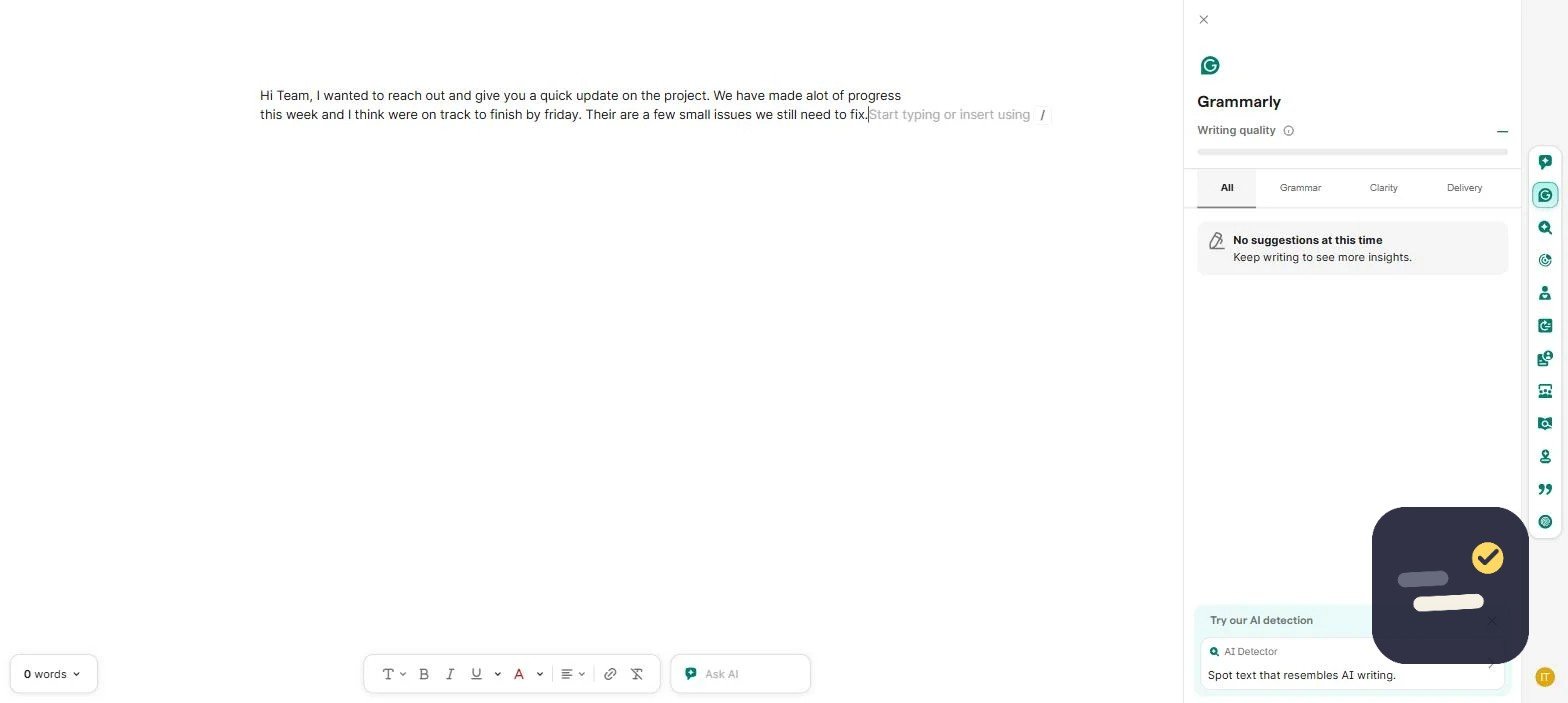
For this review, we created a real Grammarly account and ran a test paragraph deliberately loaded with common mistakes — a run-on sentence, a misplaced modifier, and a tone shift — through the editor to see what it caught versus what a standard spell checker misses. The screenshot earlier in this post shows Grammarly’s live suggestions on that exact test. We also cross-checked the free vs. Pro feature gaps directly against Grammarly’s own pricing page rather than relying on older comparisons, since these plans get updated periodically.
Is Grammarly Safe for Confidential Documents?
This comes up a lot for freelancers handling client contracts or NDAs, so it’s worth addressing directly. Grammarly processes text through its cloud servers to generate suggestions, which means content does pass through their infrastructure rather than staying purely local. Grammarly’s own policy states that user content isn’t sold or used to train models without consent for Business tier accounts, and their SOC 2 compliance covers standard data-handling practices. That said, if you’re under a strict NDA that prohibits any third-party tool from touching a document, the safest move is checking with whoever drafted the agreement before running confidential text through any browser extension — Grammarly included.
Getting the Most Out of Grammarly
A few settings changes make a real difference once you’ve been using it for a week or two. First, set your goals (audience, formality, domain) at the top of the editor — Grammarly’s suggestions shift noticeably once it knows you’re writing a formal email versus a casual social post. Second, review the vocabulary suggestions rather than accepting them blindly; some swaps sound more natural in isolation than in context. Third, if you write in a specific niche with jargon Grammarly doesn’t recognize, add those terms to your personal dictionary early so you’re not dismissing the same false-positive flags every day.

Written by Ivan T.
Founder of StackToolsHQ. Writes hands-on reviews and comparisons of productivity and AI tools for freelancers, small teams, and remote workers. More about this site.